
First don’t panic, keep calm and SEO Audit ON! Start with the basics such as checking the issue is not simply some form of tracking not working. Then break SEO down into its constituting parts. Then break it down further.
I and lots of other SEOs start with technical SEO, then on-site and on-page factors and finally the less likely here, but not completely impossible off page SEO. This last is unlikely in website redesign but possible, we’ll explore some scenarios towards the end of this post.
TL;DR Too long didn’t read
- Number one check that the tracking code is in place
- Crawlability Googlebot access
- Indexability Googlebot “may not like your page(s)”
- 301 Redirects – ensure all pages from old site are properly redirected and all versions of each one.
- Website speed – general (code, server, images, content, etc.)
- Website speed – images are not optimised
- Check all important pages from the old site still exist in the new site
- Ensure that all content with good rankings in the previous version of the website still exists
- Drill down on content that changed significantly
- Ensure your CMS is not spamming your meta titles and meta descriptions – eg half the title is the same in all pages (common)
- Off-site incoming broken link paths
- Lots of bad links coincide with time you launch the new site (unlikely)
TECHNICAL SEO MUST CHECK
1 – Number one check that the tracking code is in place
Since you launched the new site is your Google Analytics (GA) tracking code present in all the pages?
There are a number of ways of checking GA code is in place for the most common one is to view the source code of the page or pages in question and look for the Google analytics code.
Make sure you do this in an incognito browser window or logged out of your Google account as Admins may be excluded particularly in WordPress sites.

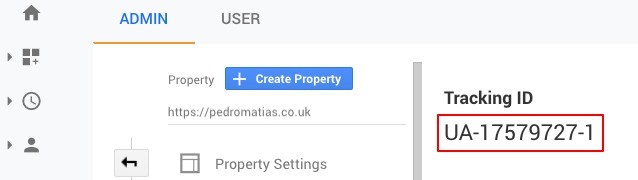
Also make sure the tracking ID within the tracking code matches the one in your GA account, sometimes code is present but ID mismatch. In this case UA-17579727-1 should match the ID in GA.
2 – Crawlability Googlebot
Coming back to our favourite content management system WordPress, but also on any content management system or even without one. I would say this is more likely in any other CMS than WordPress, simply because all other have less SEO inbuilt SEO functionality or off the shelf SEO add ons (plugins).
Your developer may have accidentally blocked a part of the site, or even the entire site from being seen by Google, what we call Crawlability, Google’s ability to see the pages on your site, which means that Google cannot crawl, cannot see those pages and therefore cannot add them to their database, it cannot index them.
If any of these pages were important pages with very good traffic this may be the reason why your SEO traffic and rankings dropped. If your traffic disappear completely this may also be the cause.
3 – Indexability Googlebot
Indexability is about making the page(s) indexable, once a page is crawlable and accessible by Google it is halfway to being indexable, but if the page is low quality and buried deep in your site, it may be hard to get it indexed. XML sitemaps help with this to some extent.
See indexability vs crawlability here from SEMrush.
4 – 301 Redirects ensure all old site pages properly redirect (301) to the new site
Very common to developers designing a new site is not to check that all page versions of a page redirect to your canonical version of those pages.
To clarify the canonical version is the version of the page that you want to be the main one that Google and users see.
This should be for example https://pedromatias.co.uk in my homepage, with the code below.
<link rel=”canonical” href=”https://pedromatias.co.uk/” />
Where this page will also have at least 3 other versions, sometimes more.
https://pedromatias.co.uk (canonical)
https://www.pedromatias.co.uk this redirects with a 301 to https://pedromatias.co.uk
HTTP versions
http://pedromatias.co.uk this redirects with a 301 to https://pedromatias.co.uk
http://www.pedromatias.co.uk this redirects with a 301 to https://pedromatias.co.uk
By now with MFI mobile first index active since 2018 and Chrome marking all HTTP pages as NOT SECURE, lots of sites have migrated to HTTPS, but not all and certainly lots that did failed to fully implement 301s properly.
5 – Website speed – general issues
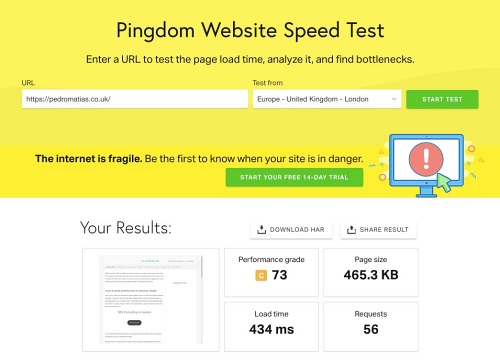
With grade C you can see there is still plenty of room for improvement, yet on Desktop on a fairly slow network 434 millisecs is FAST!
Your new website might be on a new server and the new server might be configured in a different way, which means that the site could be slower than the previous version. This won’t be the full reason but can for sure be a contributing factor.
Even if you are on the same server and moved to a new content management system or even within the same content management system but with a new template + plugins configuration.
If not taking into account SEO and all the best practices for speed this may impact your rankings and organic search traffic. Here are a few of the top industry speed tools.
- https://gtmetrix.com
- https://tools.pingdom.com
- https://developers.google.com/speed/pagespeed/insights
- https://www.thinkwithgoogle.com/intl/en-gb/feature/testmysite/
6 – Your images are not optimised
This is often the case with images that are too large in file size, but also that are not SEO or user friendly, do not provide context of what the page is about.
The basics here are usually the same and the tests above will show you which images and pages may need your attention the most.
Start with your homepage + 10, 100 or 1000 top pages depending on the scale of the site. Figure out the top heavy images on these pages. Then decide if it is optimal to crush some of them one by one. Also use CMS plugins or other advanced developer techniques for large sites. See what Kinsta says here on the subject.
ON PAGE SEO MUST CHECK
7 – Check all important pages from the old site still exist
Let’s say your side has 100, 1,000, 10,000 or 100,000 pages and in turn 10 or 20% of those are responsible for most of the traffic. These are therefore the most important ones, you should ensure that all those pages still exist.
This is particularly important for the pages that have the most traffic on the site, you should look in Google Analytics and Search Console and find out which ones were the top landing pages, then find out if those pages are still receiving the same amount of traffic.
Most likely they are not, if you excluded tracking issues, it is time to look at all these top pages in more detail as well as any keyword data to each respective page. You can begin in Search Console but also match with GA data as well as third party tools such as SEMrush or others.
8 – Ensure all content with good rankings still exists
It is highly likely the to 20% pages are responsible for 80% of the traffic, you should ensure that at the very least all those pages should exist.
The content should be more or less the same as in the previous version of the website, or if anything changed, it should represent an improvement rather than a decline of the quality of those pages.
9 – Content that changed significantly
If any of these top pages exists but lost significant organic traffic, it is almost certain the content changed in a way that Google “thinks” these pages no longer satisfy the queries they previously answered in the old site.
If you still have access to the old content, (you should ideally have a back up) try to figure out which portions of this content were relevant to the top keywords in Search Console, that no are no longer in the new equivalent pages.
10 – Meta titles and meta descriptions
I recently came across an example in WordPress and this happens more often than you think when developers don’t take into consideration how meta titles affect SEO.
With WordPress for example if your site title is composed of three word keywords:
e.g. “YourBusiness Widget Consultant”
If the title is then repeated in every single page, which Yoast for example might do with default settings, this may cause confusion to users and you may unintentionally spam the keywords in question, by spamming the keywords I mean using the same keywords in every single page.
COMMON STRUCTURE IN SOME CMSs BY DEFAULT
<title>PAGE TITLE – BUSINESS NAME </title>
In the example above we would end up with:
- <title> Widgets – YourBusiness Widget Consultant</title>
- <title> Blue Widget – YourBusiness Widget Consultant</title>
- <title> Red Widget – YourBusiness Widget Consultant</title>
- <title> Green Widget – YourBusiness Widget Consultant</title>
- <title> Purple Widget – YourBusiness Widget Consultant</title>
Now imagine this repeats over 100, 1000, 10,000 or however many pages your site might have.
OFF PAGE SEO MUST CHECK
11- Broken link paths
Off page SEO means anything that happens OUTSIDE your site, but the rest of the web that may impact your site, this is mostly links, but bad reviews and social media faux paux could also impact SEO.
Wait what? How can changes on my site during redesign affect links from the web pointing at it?
Not directly, obviously, but indirectly if 1000 links point to a given page and that page does not exist or now exists on a new URL and there’s no 301 or another redirect to it. All link value would be lost.
EXAMPLE:
OLD SITE: example.com/yourbestpage/ has 1000 links pointing at it earned over 5 years.
BECOMES:
NEW SITE: example.com/bestpage/ all value from 1000 links is lost
SOLUTION:
Redirect 301 http://example.com/yourbestpage/ 301 example.com/bestpage/et voila!
12 – Lots of bad links at the same time you launch the new site
Not very likely but if you are checking on things may as well audit the critical parts.
Google says they now deal with negative SEO, bad links and PBNs pretty well, the fact remains page one is still half occupied by PBNs… or more in lots of cases.
So do some good old link data harvesting and match them with the declines. May be your competitor decided to bombard your site with tons of low quality links, when you launched the shine new version. Possible!
Other reasons look for:
- Algorithm changes keep an hear out (always)
- SERP has changed look at your competitors
- Could your site be hacked
